Unique Lock Screen01011
Publisher Description
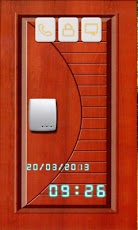
Unique Lock Screen published as a unparalleled originality mobile phone lock, has a open door appearance and unique unlocking way. It has same principle with sliding lock but more functional and interesting than general unlock tool.A phone lock owns Quick Links (link to contact book, message page), Date and Time, "SLIDING" open a door functions offered for free now!TRAIT owned:Free mobile phone screen lock.Quick link to make a call.Quick link to make a message.Unlock easily and quickly.Detail date: day/month/year.Real present time: hour : minAppearance:A gate or door placed on phone screen to protect information in phone.After drag the LOCK to open, you can see the door opening progress.It has same appearance with electronic lock. Let's know it better. An electronic lock (or the electric lock) is a kind of locking device which operates by means of electric current. Electric locks are sometimes stand-alone with an electronic control assembly mounted directly to the lock. Usually electric locks are connected to system of an access control.After downloading and install to phone, please do not forget give us good comments and we are honored to solve problems for you by receiving emails.### Known before download ####We work hard to develop apps and offered all for you with 0 money. In order to keep company running, our apps are ad supported. If you get icon ads or notification ads in software, hope you understand us. If you dislike them, just uninstall this app and please do not leave us low ratting!-------------------------------------------------------
About Unique Lock Screen
The company that develops Unique Lock Screen is HD AllinOne Team. The latest version released by its developer is 01011. This app was rated by 2 users of our site and has an average rating of 3.8.
To install Unique Lock Screen on your Android device, just click the green Continue To App button above to start the installation process. The app is listed on our website since 2013-03-27 and was downloaded 60 times. We have already checked if the download link is safe, however for your own protection we recommend that you scan the downloaded app with your antivirus. Your antivirus may detect the Unique Lock Screen as malware as malware if the download link to com.UniqueLockScreen9_3 is broken.
How to install Unique Lock Screen on your Android device:
- Click on the Continue To App button on our website. This will redirect you to Google Play.
- Once the Unique Lock Screen is shown in the Google Play listing of your Android device, you can start its download and installation. Tap on the Install button located below the search bar and to the right of the app icon.
- A pop-up window with the permissions required by Unique Lock Screen will be shown. Click on Accept to continue the process.
- Unique Lock Screen will be downloaded onto your device, displaying a progress. Once the download completes, the installation will start and you'll get a notification after the installation is finished.
Program Details
System requirements
Download information
Pricing
Version History
version 01011
posted on 2013-03-27
version 01011
posted on 2013-03-27
Several fixes and updates
